Live Note

Remain optimistic

Flutter anti-aliasing(抗锯齿) bug

问题描述

项目里有一段弧形曲线, 我选择用 Row + Expanded + Container 堆叠的方式实现,但是出现了一些很奇怪的hairline border现象.

Flutter anti-aliasing bug

原因

每个 Wrap 之间没有进行像素对齐, 重复渲染的地方导致了混色(颜色加深), 形成了hairline borderissue.

所以相同颜色,尽量避免分块去渲染,会导致抗锯齿效果不佳.

解决方案

  1. 根据更具体的像素比,去渲染对应的大小. 但是这种方法只适用于 width 和 height 都是明确的情况下, 我们通过像素比去控制实际渲染的大小尽量贴近于整数.
  2. 直接使用 custom paint 进行整体绘制. 这种方法可以避免 Wrap 之间像素对齐, 也能保证整体的抗锯齿效果.

我使用的是第二种方法, 效果如图:
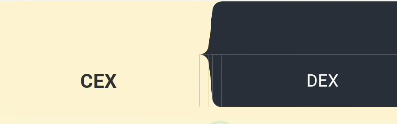
Flutter anti-aliasing solution

Read more »

Flutter web 在 iOS 18.2 版本上只能用两指滑动滚动

issue 地址: [iOS 18.2][Web] Scrolling is broken in browsers (Safari, Chrome)

flutter 版本为 3.25.x, 低于 iOS 18.2 的设备上, 可以单指滚动

原因

Safari 在 iOS 18.2 添加了 getCoalescedEvents()支持, 这个方法用于合并多个 touch 事件,有助于提高性能.
但是 api 是不完整的(与其他浏览器内核实现不符, 缺少了 pointerId 和 target 等返回值), 在 flutter 3.27.1 修改了 binding 部分的内容, 用于兼容: [web] Work around wrong pointerId in coalesced events in iOS Safari 18.2

解决方案

把 flutter 升级到 3.27.1 版本, 或者使用 flutter channel dev 切换到 dev 分支, 然后 flutter upgrade 升级到最新 beta 版本.
也可以将 pr 合并到本地 flutter engine, 直接构建 flutter web 项目.

效果如下:

  • 分为三部分,上部,中部,下部。
  • 上部为 header 部分,不吸顶。
  • 中部吸顶。
  • 下部为 SubPages 部分,可以左右滑动切换页面子页面。
Read more »

Null-aware operators

1
2
3
4
5
6
7
8
9
10
String foo = 'a string';
String bar; // Unassigned objects are null by default.

// Substitute an operator that makes 'a string' be assigned to baz.
String baz = foo ?? bar;

void updateSomeVars() {
// Substitute an operator that makes 'a string' be assigned to bar.
bar ??= 'a string';
}

Conditional property access

myObject?.someProperty equals to (myObject != null) ? myObject.someProperty : null.

1
2
3
4
5
6
// This method should return the uppercase version of `str`
// or null if `str` is null.
String upperCaseIt(String str) {
// Try conditionally accessing the `toUpperCase` method here.
return str?.toUpperCase();
}

Cascades

myObject.someMethod() will get the return value of the someMethod(), myObject..someMethod() will get the reference of the myObject.

1
2
3
4
5
6
7
8
9
10
11
12
13
14
15
16
17
18
19
class BigObject {
int anInt = 0;
String aString = '';
List<double> aList = [];
bool _done = false;

void allDone() {
_done = true;
}
}

BigObject fillBigObject(BigObject obj) {
// Create a single statement that will update and return obj:
return obj
..anInt = 1
..aString = "String!"
..aList = [3.0]
..allDone();
}
Read more »

基本用法

1
2
3
4
5
6
7
8
9
10
function* testGenerator() {
yield "hello"
yield "world"
return "done"
}
let test = testGenerator()
test.next() // { value : 'hello', done : false }
test.next() // { value : 'world', done : false }
test.next() // { value : 'done', done : true }
test.next() // { value : undefined, done : true }
Read more »